Elasticsearch-API

命令形式

API格式

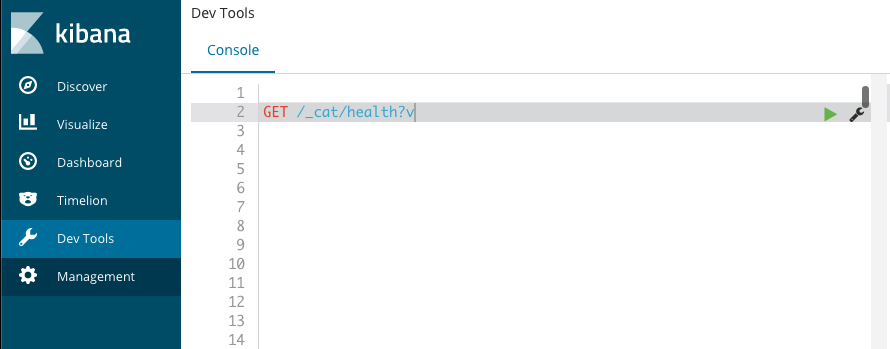
在 kibana 中执行

1
GET /_cat/health?v

curl访问API

在 terminal 中执行

1
curl -XGET "localhost:9200/_cat/shards?v"

集群操作

获取健康信息

1
2
3
## output
ip heap.percent ram.percent cpu load_1m load_5m load_15m node.role master name
127.0.0.1 59 97 7 1.98 dimr * C02CF1LYMD6Q

获取分片信息

1
2
3
4
5
curl -XGET "localhost:9200/_cat/shards?v"
## output
index shard prirep state docs store ip node
customer 0 p STARTED 0 208b 127.0.0.1 C02CF1LYMD6Q
customer 0 r UNASSIGNED

获取节点信息

1
2
3
4
curl -XGET "localhost:9200/_cat/nodes?v"
## output
epoch timestamp cluster status node.total node.data shards pri relo init unassign pending_tasks max_task_wait_time active_shards_percent
1626836684 03:04:44 elasticsearch_brew yellow 1 1 2 2 0 0 1 0 - 66.7%

索引操作

命令末尾追加pretty,可以漂亮地打印JSON响应(如果有的话)

创建索引

1
2
3
4
5
6
7
curl -XPUT 'localhost:9200/customer?pretty'
## output
{
"acknowledged" : true,
"shards_acknowledged" : true,
"index" : "customer"
}

查询索引

显示所有索引信息, 若索引太多,建议重定向到文件中,避免终端显示不完整 curl -XGET 'localhost:9200/_cat/indices?v' > tmp.log

1
2
3
4
curl -XGET 'localhost:9200/_cat/indices?v'
## output
health status index uuid pri rep docs.count docs.deleted store.size pri.store.size
yellow open customer 1ROsx5JQTluas2hEGLh0Qg 1 1 0 0 208b 208b

删除索引

1
2
3
4
5
curl -XDELETE 'localhost:9200/customer?pretty'
## output
{
"acknowledged" : true
}

文档操作

Elasticsearch并不要求,先要有索引,才能将文档编入索引。创建文档时,如果指定索引不存在,将自动创建

创建文档

将一个客户文档放到 customer 索引中, ID 为1

1
2
3
4
5
6
7
8
9
10
11
12
13
14
15
16
17
18
19
20
21
22
23
24
25
##API:
PUT /customer/_doc/1?pretty
{"name":"John Doe"}

## curl命令访问API:
curl -XPUT "localhost:9200/customer/_doc/1?pretty" -H 'Content-Type: application/json' -d'
{
"name": "John Doe"
}
'
## output
{
"_index" : "customer",
"_type" : "_doc",
"_id" : "1",
"_version" : 1,
"result" : "created",
"_shards" : {
"total" : 2,
"successful" : 1,
"failed" : 0
},
"_seq_no" : 0,
"_primary_term" : 1
}

查询文档

在 customer 索引中查询 文档 id 为 1 的数据

1
2
3
4
5
6
7
8
9
10
11
12
13
14
curl -XGET "localhost:9200/customer/_doc/1?pretty"
## output
{
"_index" : "customer",
"_type" : "_doc",
"_id" : "1",
"_version" : 1,
"_seq_no" : 0,
"_primary_term" : 1,
"found" : true,
"_source" : {
"name" : "John Doe"
}
}

更新文档

Elasticsearch实际上并没有在底层执行就地更新,而是先删除旧文档,再添加新文档

修改数据

将 customer 索引中文档 ID 为 1 的 name 更改为 “Jane Doe”

1
2
3
4
5
6
7
8
9
10
11
12
13
14
15
16
17
18
19
20
21
22
23
24
25
26
27
28
29
30
31
32
33
34
curl -XPOST "localhost:9200/customer/_update/1?pretty" -H 'Content-Type: application/json' -d'
{
"doc": {"name": "Jane Doe"}
}'
## output
{
"_index" : "customer",
"_type" : "_doc",
"_id" : "1",
"_version" : 2,
"result" : "updated",
"_shards" : {
"total" : 2,
"successful" : 1,
"failed" : 0
},
"_seq_no" : 1,
"_primary_term" : 1
}
## 再次查询,可以看到数据已经修改了
curl -XGET "localhost:9200/customer/_doc/1?pretty"
## output
{
"_index" : "customer",
"_type" : "_doc",
"_id" : "1",
"_version" : 2,
"_seq_no" : 1,
"_primary_term" : 1,
"found" : true,
"_source" : {
"name" : "Jane Doe"
}
}

添加字段

把文档(ID为1)中的name字段更改为 “Altman”,再添加一个年龄字段: age

1
2
3
4
5
6
7
8
9
10
11
12
13
14
15
16
17
18
19
20
21
22
23
24
25
26
27
28
29
30
31
32
33
34
35
36
curl -XPOST "localhost:9200/customer/_update/1?pretty" -H 'Content-Type: application/json' -d'
{
"doc": {"name": "Altman", "age": 18}
}
'
## output
{
"_index" : "customer",
"_type" : "_doc",
"_id" : "1",
"_version" : 3,
"result" : "updated",
"_shards" : {
"total" : 2,
"successful" : 1,
"failed" : 0
},
"_seq_no" : 2,
"_primary_term" : 1
}
## 再次查询,可以看到数据已经修改了
curl -XGET "localhost:9200/customer/_doc/1?pretty"
## output
{
"_index" : "customer",
"_type" : "_doc",
"_id" : "1",
"_version" : 3,
"_seq_no" : 2,
"_primary_term" : 1,
"found" : true,
"_source" : {
"name" : "Altman",
"age" : 18
}
}

脚本执行

使用脚本将年龄增加5岁

1
2
3
4
5
6
7
8
9
10
11
12
13
14
15
16
17
18
19
20
21
22
23
24
25
26
27
28
29
30
31
32
33
34
35
36
curl -XPOST "localhost:9200/customer/_update/1?pretty" -H 'Content-Type: application/json' -d'
{
"script" : "ctx._source.age += 5"
}
'
## output
{
"_index" : "customer",
"_type" : "_doc",
"_id" : "1",
"_version" : 4,
"result" : "updated",
"_shards" : {
"total" : 2,
"successful" : 1,
"failed" : 0
},
"_seq_no" : 3,
"_primary_term" : 1
}
## 再次查询,可以看到数据已经修改了
curl -XGET "localhost:9200/customer/_doc/1?pretty"
## output
{
"_index" : "customer",
"_type" : "_doc",
"_id" : "1",
"_version" : 4,
"_seq_no" : 3,
"_primary_term" : 1,
"found" : true,
"_source" : {
"name" : "Altman",
"age" : 23
}
}

删除文档

删除文档 ID 为 2 的数据,注 该 ID 不存在

1
2
3
4
5
6
7
8
9
10
11
12
13
14
15
16
curl -XDELETE "localhost:9200/customer/_doc/2?pretty"
## output
{
"_index" : "customer",
"_type" : "_doc",
"_id" : "2",
"_version" : 1,
"result" : "not_found",
"_shards" : {
"total" : 2,
"successful" : 1,
"failed" : 0
},
"_seq_no" : 4,
"_primary_term" : 1
}

批处理

先将 customer 索引删除,重建,然后执行下面

某个操作失败不会导致批量API执行中断,剩下的操作将继续执行。当_bulk API返回时,它将为每个操作提供一个状态(与发送操作的顺序相同),以便检查某个特定操作是否失败。

在一个批量操作中,创建两个文档

1
2
3
4
5
6
7
8
9
10
11
12
13
14
15
16
17
18
19
20
21
22
23
24
25
26
27
28
29
30
31
32
33
34
35
36
37
38
39
40
41
42
43
44
45
46
47
48
49
50
51
52
53
54
55
56
57
58
59
60
61
62
63
64
65
66
67
68
69
70
71
72
73
74
75
76
77
78
79
80
81
82
83
84
85
86
87
curl -XPOST 'localhost:9200/customer/_bulk?pretty' -H 'Content-Type: application/json' -d '
{"index":{"_id":"1"}}
{"name": "John, Doe"}
{"index":{"_id":"2"}}
{"name": "Jane, Doe"}
'
## output
{
"took" : 231,
"errors" : false,
"items" : [
{
"index" : {
"_index" : "customer",
"_type" : "_doc",
"_id" : "1",
"_version" : 1,
"result" : "created",
"_shards" : {
"total" : 2,
"successful" : 1,
"failed" : 0
},
"_seq_no" : 0,
"_primary_term" : 1,
"status" : 201
}
},
{
"index" : {
"_index" : "customer",
"_type" : "_doc",
"_id" : "2",
"_version" : 1,
"result" : "created",
"_shards" : {
"total" : 2,
"successful" : 1,
"failed" : 0
},
"_seq_no" : 1,
"_primary_term" : 1,
"status" : 201
}
}
]
}
## 查看这个索引里面的所有数据
curl -XGET 'localhost:9200/customer/_search?q=*&pretty'
## output
{
"took" : 97,
"timed_out" : false,
"_shards" : {
"total" : 1,
"successful" : 1,
"skipped" : 0,
"failed" : 0
},
"hits" : {
"total" : {
"value" : 2,
"relation" : "eq"
},
"max_score" : 1.0,
"hits" : [
{
"_index" : "customer",
"_type" : "_doc",
"_id" : "1",
"_score" : 1.0,
"_source" : {
"name" : "John, Doe"
}
},
{
"_index" : "customer",
"_type" : "_doc",
"_id" : "2",
"_score" : 1.0,
"_source" : {
"name" : "Jane, Doe"
}
}
]
}
}

在一个批量操作中,更新第一个文档,删除第二个文档

对于delete操作,只需提供被删除文档的ID即可

1
2
3
4
5
6
7
8
9
10
11
12
13
14
15
16
17
18
19
20
21
22
23
24
25
26
27
28
29
30
31
32
33
34
35
36
37
38
39
40
41
42
43
44
45
46
curl -XPOST 'localhost:9200/customer/_bulk?pretty' -H 'Content-Type: application/json' -d '
{"update": {"_id":"1"}}
{"doc": {"name": "Johe Doe becomes Jane Doe" }}
{"delete": {"_id":"2"}}
'
## output
{
"took" : 52,
"errors" : false,
"items" : [
{
"update" : {
"_index" : "customer",
"_type" : "_doc",
"_id" : "1",
"_version" : 2,
"result" : "updated",
"_shards" : {
"total" : 2,
"successful" : 1,
"failed" : 0
},
"_seq_no" : 2,
"_primary_term" : 1,
"status" : 200
}
},
{
"delete" : {
"_index" : "customer",
"_type" : "_doc",
"_id" : "2",
"_version" : 2,
"result" : "deleted",
"_shards" : {
"total" : 2,
"successful" : 1,
"failed" : 0
},
"_seq_no" : 3,
"_primary_term" : 1,
"status" : 200
}
}
]
}

参考资料

Elasticsearch 使用集群